🏗️ Building a Self-Healing HAProxy + Consul Cluster (and Everything That Went Wrong Along the Way)
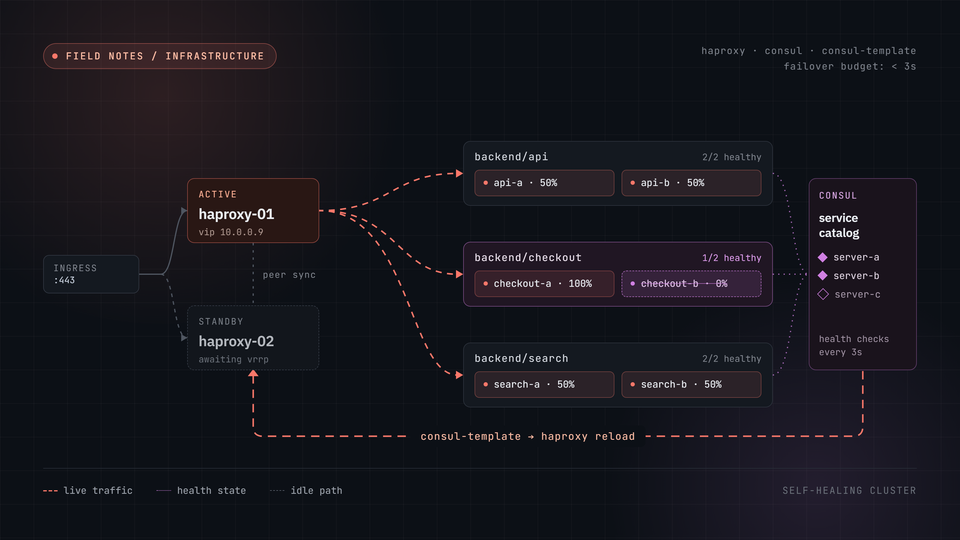
For years, my inbound traffic story was simple: a routed /29 meant every service got its own public IP, and routing was mostly "point DNS at the right address and move on." That changed when the ISP migration forced a move to a single dynamic PPPoE address. Suddenly every public-facing service, the blog, NetBox, Authentik, needed to share one IP and one port 443.
That meant one thing: a proper reverse proxy layer, done right. Not a single point of failure, not a hand-maintained config file, and not something I'd need to SSH in and edit every time a new service showed up.
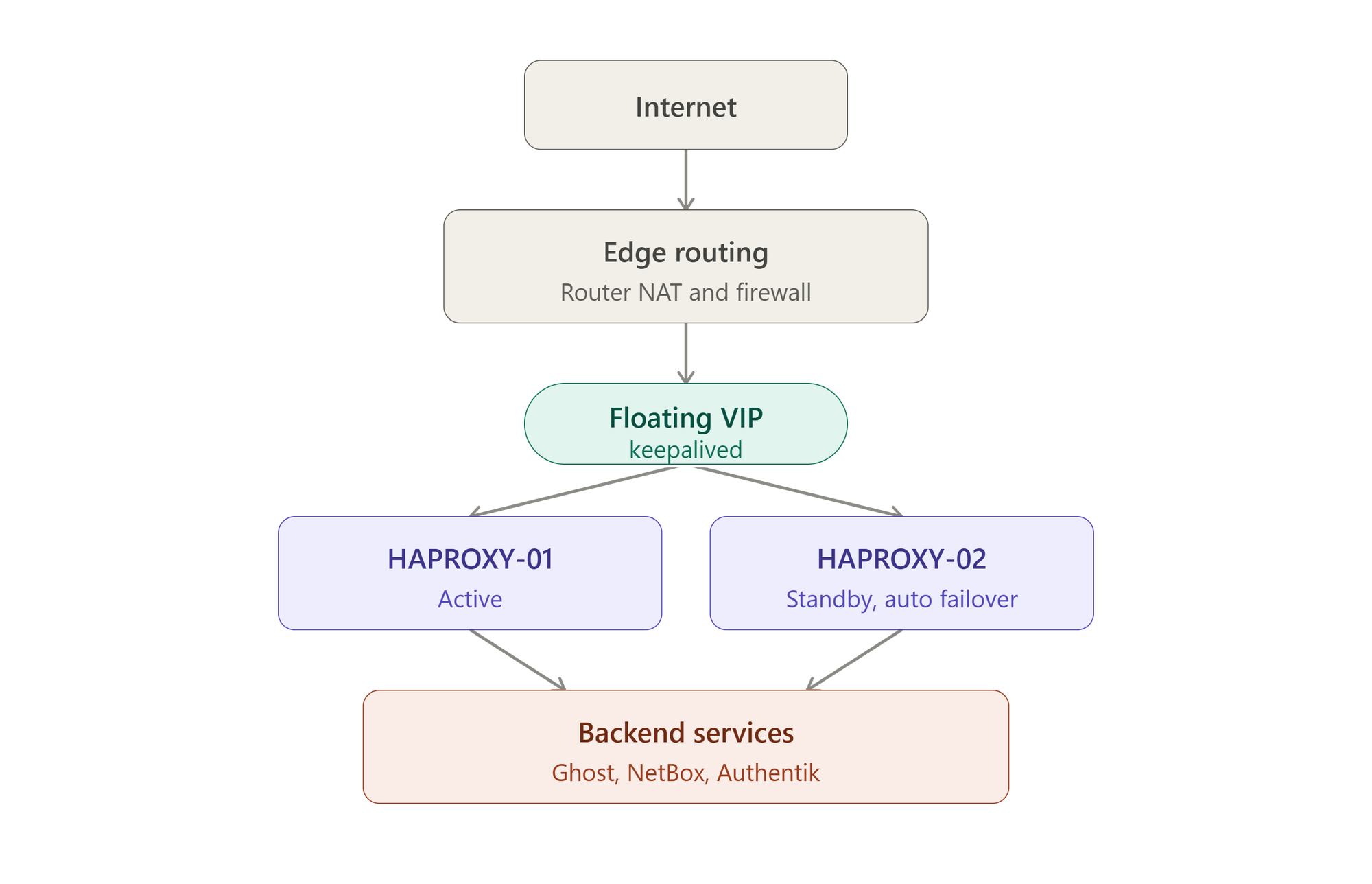
This post walks through what I actually built: HAProxy in an active/passive HA pair, backed by a 3-node Consul cluster for configuration, fronted by Terraform + Ansible for repeatability, and every single thing that broke on the way there, because there was a lot.
🎯 What I was aiming for
- A single VIP fronting HTTPS for every internal service
- Automatic failover between two HAProxy nodes, no manual intervention if one dies
- Backends that don't need a config edit and reload every time something changes
- Real TLS, automatically renewed
- A basic WAF layer, and IP-based access control for anything that shouldn't be fully public
- All of it reproducible from scratch via Terraform + Ansible, not hand-built
1️⃣ The infrastructure layer: Terraform
Two new VMs (HAPROXY-01, HAPROXY-02) and a dedicated Consul node (CONSUL-01), cloned from the same packer-ubuntu2604 template used elsewhere in the homelab, provisioned via the existing NetBox to Terraform to Ansible pipeline.
A few things worth calling out from this stage:
⚠️ Gotcha #1, Proxmox clones can boot into the OS installer. If the template still has install media attached, a clone can inherit boot-from-CD behaviour and land on the Ubuntu installer's language-select screen instead of booting the actual disk. Fix: explicitly detach the CD-ROM (cdrom { file_id = "none" }in thebpg/proxmoxTerraform provider) rather than assuming a clone always boots the right thing.
⚠️ Gotcha #2,dpkglock contention on fresh boots. Freshly booted Ubuntu VMs often haveunattended-upgradesor theapt-dailytimers running automatically, holding the dpkg lock while Ansible's ownapttasks time out waiting for it. Ansible'saptmodule defaults to a 60 second wait, not always long enough. Settinglock_timeout: 300on everyapttask fixed this outright.
The VMs sit on a dedicated Proxmox SDN VNet (not a plain Linux bridge), so the network device config points at the VNet name directly rather than a vmbr0 plus VLAN tag combination.
2️⃣ Consul: a real 3-node cluster, not one server and two hangers-on
Originally I stood up a single Consul server (CONSUL-01) with the two HAProxy nodes as clients reaching across the network. That works, but it's not resilient: lose CONSUL-01 and the whole config-discovery layer goes with it.
The better answer: all three nodes, CONSUL-01, HAPROXY-01, HAPROXY-02, run Consul in server mode, forming a genuine 3-node cluster with real quorum. bootstrap_expect and retry_join are computed dynamically from the Ansible inventory group, so adding a fourth member later is an inventory change, not a template rewrite.
⚠️ Gotcha #3, Consul isn't in the default apt repos. apt install consul just fails with "No package matching 'consul' is available" unless the HashiCorp apt repository has actually been added first (GPG key plus repo line). Easy to assume it's already there when it isn't.3️⃣ HAProxy config, but nobody edits haproxy.cfg by hand
This is the part I'm most pleased with. haproxy.cfg isn't templated by Ansible at all, it's rendered by consul-template, watching Consul for changes and re-rendering (with validation) automatically. Right now that covers the static backend list (Ghost, NetBox, Authentik), stored as JSON in Consul KV and pushed out by Ansible.
The template also has support baked in for fully dynamic backend discovery, containers registering themselves in Consul's service catalog and appearing in HAProxy automatically with zero config changes, but I haven't actually flipped that on yet. That's a follow-up post once it's live on real Docker hosts.
⚠️ Gotcha #4,unzipwasn't installed.consul-templateships as a.zip. The base image didn't haveunzip. Ansible'sunarchivemodule tried every other archive tool it knew (tar with various decompressors) before giving up with a wall of errors. One missing package, most confusing failure message of the whole project.
🔐 TLS: Let's Encrypt via acme.sh
Wildcard cert, DNS-01 challenge via Cloudflare, matching the pattern already used elsewhere in the homelab.
⚠️ Gotcha #5,acme.shdefaults to ZeroSSL, not Let's Encrypt. Without explicitly passing--server letsencrypt,acme.shsilently issued against ZeroSSL instead, confirmed by "Using CA: https://acme.zerossl.com/..." buried in the log output. The actual failure that surfaced it was a ZeroSSL rate-limit/processing hiccup that had nothing to do with the DNS-01 validation itself (which worked perfectly). One explicit flag fixed it.
4️⃣ Health checks: the one that took three attempts
This is the gotcha I'm least proud of, because it took three separate wrong turns before landing on the fix.
Attempt 1: HAProxy's http-check send rules were silently ignored entirely unless option httpchk (bare, no arguments) was also declared. Without it, HAProxy quietly falls back to a bare TCP/TLS connect check, meaning health checks looked configured, but weren't actually checking anything at the HTTP layer.
Attempt 2: Fixed that, and immediately every single backend, four completely different stacks (Ghost, NetBox, Authentik), started failing with an identical, instant 400 Bad Request. My first guess was a missing ver HTTP/1.1 on the check. Wrong. Didn't fix it.
Attempt 3, the actual answer: HAProxy's http-check send machinery auto-injects a Content-Length: 0 header on GET checks, and plenty of backends reject that as malformed (there's an open HAProxy GitHub issue about exactly this). The fix: bypass option httpchk entirely and hand-craft the check with tcp-check, which sends exactly the bytes you tell it to and nothing more:
option tcp-check
tcp-check connect ssl
tcp-check send GET\ /healthz\ HTTP/1.1\r\n
tcp-check send Host:\ example.com\r\n
tcp-check send Connection:\ close\r\n
tcp-check send \r\n
tcp-check expect rstring ^HTTP/1\.[01]\ 200
Verbose, but it works, and it's honest about exactly what's being sent, no more guessing what HAProxy is silently adding on your behalf.
5️⃣ Access control: Cloudflare-only, internal-only, and a WAF
Three separate layers, stackable per service:
- Cloudflare IP allowlist: the public blog only accepts connections from Cloudflare's published edge ranges. Direct-to-origin requests get a flat 403.
- RFC1918-only allowlist: internal admin tools (NetBox) are restricted to private address space only, even though they sit behind the same VIP as the public sites.
- coraza-spoa: a modern, actively maintained ModSecurity/OWASP CRS-compatible WAF, wired in via HAProxy's SPOE filter mechanism. Deployed in
DetectionOnlymode first, logs suspicious requests without blocking, so real traffic can be watched before anything gets switched to actually block.
Both allowlists are JSON arrays in Consul KV, refreshed automatically (a small systemd timer pulls Cloudflare's current ranges daily) and reused across both HAProxy nodes without any manual syncing.
6️⃣ The one where I blocked myself
After all of the above was working internally, one service, refused every external connection attempt. curl returned a flat Connection refused, not a timeout, which matters: refused means something actively answered and rejected it.
The investigation went, roughly:
- Router NAT config, clean. The port-forward rule was correct.
- pfSense firewall rules, a wall of
pfctl -sroutput to read through, nothing obviously wrong. - Checked live NAT translations on the router and found something interesting: real Cloudflare edge IPs were successfully connecting to the VIP right now. So the public path worked, just not for my own direct test connections.
That was the tell. pfSense has a built-in adaptive overload mechanism, a connection-rate-limiting rule that automatically adds source IPs to a block table if they trip a threshold. After dozens of rapid manual curl tests over the course of debugging, my own testing IP had tripped it and landed in the block table.
😅 Gotcha #6, the most self-inflicted one. The exact kind of automated protection you'd want catching a real attacker caught me instead, for testing too enthusiastically. Cleared with pfctl -t virusprot -T delete <ip>, and everything worked immediately.📊 Final architecture, at a glance
| Layer | Tool | Purpose |
|---|---|---|
| Provisioning | Terraform + NetBox | VM creation, IP allocation |
| Configuration | Ansible | Package installs, service config, TLS |
| Service discovery | Consul (3-node cluster) | Backend config, key/value storage |
| Config rendering | consul-template | Watches Consul, renders and reloads HAProxy |
| Load balancing | HAProxy (active/passive) | TLS termination, routing, health checks |
| Failover | keepalived | VIP failover between HAProxy nodes |
| TLS | acme.sh + Let's Encrypt | Wildcard cert via Cloudflare DNS-01 |
| WAF | coraza-spoa (OWASP CRS) | Request inspection, DetectionOnly to start |
| Access control | Consul KV allowlists | Cloudflare-only / RFC1918-only per service |
💭 Final Thoughts
None of the individual pieces here are exotic, HAProxy, Consul, and Let's Encrypt are all well-trodden ground. What made this project worth writing up is how many of the failures were silent rather than loud: a health check that looked configured but wasn't running, a CA that wasn't the one I asked for, a firewall rule blocking me specifically rather than the traffic I was worried about. Nearly every gotcha in this post produced a plausible-looking but wrong signal before the real cause showed itself.
The payoff is a setup that now genuinely runs itself for the static side of things, and a clear path to full dynamic backend discovery once the Docker hosts are ready. That's a post for another day.
🛠️ Recommended Tools & Resources
- HAProxy documentation
- Consul and consul-template
- acme.sh
- coraza-spoa and the OWASP Core Rule Set
- Cloudflare IP Ranges, kept fresh via a small refresh script. This is in addition to using kestra to do update via templates and using python via Kestra instead.
About the author
Tim Wilkes is a UK-based security architect with over 15 years of experience in electronics, Linux, and Unix systems administration. Since 2021, he's been designing secure systems for a telecom company while indulging his passions for programming, automation, and 3D printing. Tim shares his projects, tinkering adventures, and tech insights here - partly as a personal log, and partly in the hopes that others will find them useful.
Want to connect or follow along?
LinkedIn: [phpsytems]
Twitter / X: [@timmehwimmy]
Mastodon: [@timmehwimmy@infosec.exchange]
If you've found a post helpful, consider supporting the blog - it's a part-time passion that your support helps keep alive.
⚠️ Disclaimer
This post may contain affiliate links. If you choose to purchase through them, I may earn a small commission at no extra cost to you. I only recommend items and services I’ve personally read or used and found valuable.
As an Amazon Associate I earn from qualifying purchases.