Monitor Your Ghost Blog with the Home Assistant Ghost Integration
Introduction
If you run a Ghost blog and use Home Assistant, there is now a simple way to monitor your blog from your smart home dashboard.
As of the Home Assistant 2026.3 release, the platform now includes a Ghost integration that allows you to connect your blog and expose useful sensors about your site.
I had previously used webhooks from Ghost to trigger Kestra automations and notifications, but this time I wanted to explore what the official integration could do.
You can find the official documentation here:
https://www.home-assistant.io/integrations/ghost/
Adding the Ghost Integration
Adding the integration is straightforward.
- Go to Settings → Devices & Services
- Click Add Integration
- Search for Ghost
- Enter your site URL
In my case I added:
https://blog.php-systems.com
Then click Next.
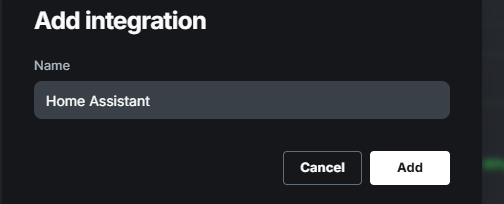
You should then be taken to the integration configuration screen.
Add Integration Screen
Common Error: "Try upgrading your Ghost API client"
When I first attempted to add the integration, I received the following error:
Error: "help":"Try upgrading your Ghost API client."
This was surprising because I was already running the latest Ghost v5 release.
After some investigation, the issue was that the Home Assistant integration expects Ghost v6.
Upgrading my Ghost installation resolved the problem.
I followed this guide to perform the upgrade:
https://blog.arfy.ca/how-to-update-ghost-blog-road-to-ghost-v6/
Once upgraded, the integration connected immediately.
What Information Can Home Assistant See?
Once connected, the integration exposes several useful entities in Home Assistant.
These include:
- Latest Post
- Total posts
- Scheduled posts
- Draft posts
- Published posts
You can then display these sensors directly in your Home Assistant dashboard. If you are moneytizing your ghost blog with the built in tools, stats for those may well show up too.
Integration Example
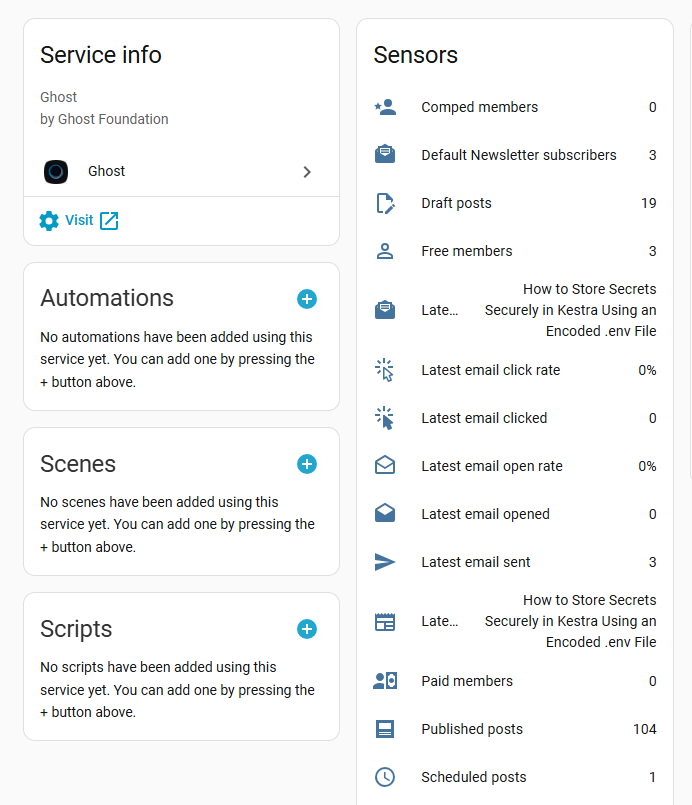
This makes it easy to monitor the health and activity of your blog without logging into Ghost.
Useful Automations
The real power comes when you start building automations using the Ghost sensors.
Here are two automations I found particularly useful.
1. Alert When Scheduled Posts Are Low
If you rely on scheduled content, you can create an automation that alerts you when your scheduled posts fall below a threshold.
Example use case:
- Trigger when scheduled_posts < 3
- Send a mobile notification
- Add a reminder to write new content
This helps maintain a consistent publishing schedule. Example code:
alias: Ghost - Scheduled Posts Low
description: Alert when Ghost scheduled posts drop below threshold
trigger:
  - platform: numeric_state
    entity_id: sensor.ghost_scheduled_posts
    below: 3

condition: []

action:
  - service: notify.mobile_app_your_phone
    data:
      title: "Ghost Blog Alert"
      message: "Your scheduled posts are running low. Time to write new content!"

mode: single
2. Schedule Time to Write a Blog Post
Another simple but effective automation is a writing reminder.
For example:
- Every Sunday evening
- If scheduled posts are below your threshold
- Send a notification:
"You need to write a blog post for the week."
Sample Code:
alias: Ghost - Weekly Blog Writing Reminder
description: Remind me to write a blog post if scheduled posts are low
trigger:
  - platform: time
    at: "19:00:00"

condition:
  - condition: time
    weekday:
      - sun
  - condition: numeric_state
    entity_id: sensor.ghost_scheduled_posts
    below: 3

action:
  - service: notify.mobile_app_your_phone
    data:
      title: "Blog Writing Reminder"
      message: "Scheduled posts are low. Set aside time to write a new blog post."

mode: single
If you use smart speakers or dashboards, you could even display the reminder in your office. You can always set a recurring calendar reminder as well to write more content on a regular basis.
Why This Integration Is Useful
For anyone running a Ghost blog alongside Home Assistant, this integration provides:
- Quick visibility into blog activity
- Automation triggers for content planning
- Version monitoring for your Ghost install
- A fun way to combine blogging with home automation
It may not replace Ghost’s admin panel, but it adds useful insight directly into your Home Assistant environment.
Final Thoughts
The Ghost integration for Home Assistant is a simple but useful addition for anyone running both platforms.
It only takes a few minutes to set up, and once connected you can create helpful automations that keep your content pipeline healthy.
If you already use Home Assistant for productivity automations, this integration is definitely worth trying.
About the author
Tim Wilkes is a UK-based security architect with over 15 years of experience in electronics, Linux, and Unix systems administration. Since 2021, he's been designing secure systems for a telecom company while indulging his passions for programming, automation, and 3D printing. Tim shares his projects, tinkering adventures, and tech insights here - partly as a personal log, and partly in the hopes that others will find them useful.
Want to connect or follow along?
LinkedIn: [phpsytems]
Twitter / X: [@timmehwimmy]
Mastodon: [@timmehwimmy@infosec.exchange]
If you've found a post helpful, consider supporting the blog - it's a part-time passion that your support helps keep alive.
⚠️ Disclaimer
This post may contain affiliate links. If you choose to purchase through them, I may earn a small commission at no extra cost to you. I only recommend items and services I’ve personally read or used and found valuable.
As an Amazon Associate I earn from qualifying purchases.