Enhancing Firefly III Transaction Categorization Using SearxNG and Node-RED
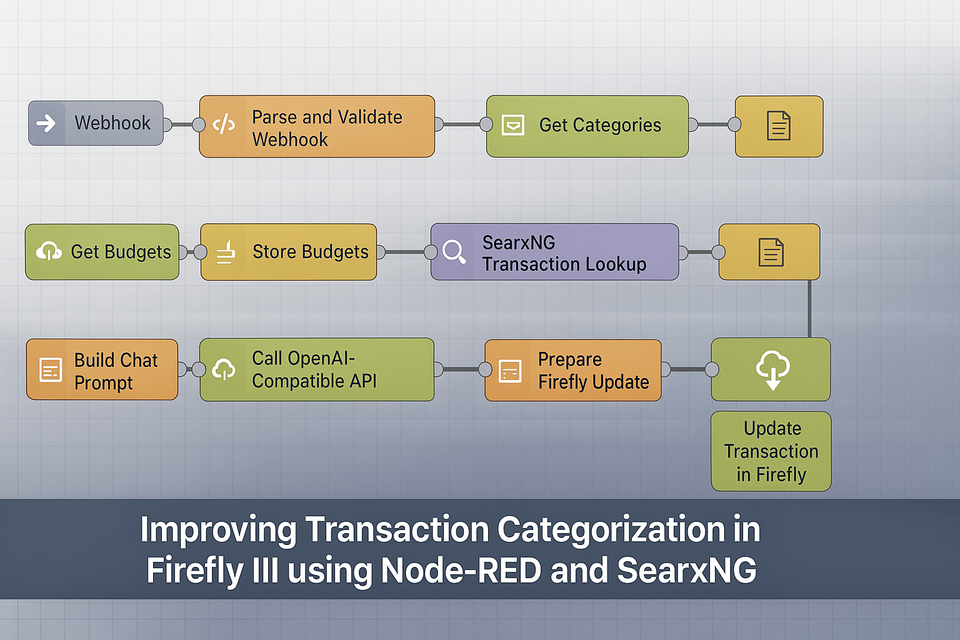
Managing personal finances effectively often means keeping your transactions accurately categorized and assigned to budgets. Previously, we automated this in Firefly III using an AI-powered Node-RED workflow that would classify transactions and apply budgets. Today, we’re enhancing this workflow by integrating SearxNG, an open-source metasearch engine, to provide additional context that improves AI classification accuracy.
In this post, we’ll cover:
- Why adding SearxNG improves classification
- Updating the Node-RED workflow
- Installing and configuring SearxNG via Docker Compose
- Importing the new workflow into Node-RED
Why Use SearxNG?
Our earlier workflow relied solely on the AI model to categorize transactions. While effective for common vendors, it sometimes struggled with unfamiliar merchants or ambiguous descriptions. By querying SearxNG with the transaction description, we can provide the AI with relevant contextual information from the web, helping it assign the correct category and budget more accurately.
Installing SearxNG via Docker Compose
SearxNG can be quickly installed using Docker Compose. Here’s a simple setup:
- Create a directory for SearxNG:
mkdir /opt/searxng && cd /opt/searxng
- Create
docker-compose.yml:
version: "3"

services:
  searxng:
    image: searxng/searxng:latest
    container_name: searxng
    ports:
      - "8888:8080"
    volumes:
      - /opt/searxng/settings.yml:/etc/searxng/settings.yml
restart: unless-stopped- Create a basic
settings.ymlto enable JSON output:
server:
  base_url: http://localhost:8888
search:
  default_lang: en
  results_per_page: 5
  output_format: json  # Important: produces JSON output for Node-RED
search:
  formats:
    - html
- json- Start SearxNG:
docker-compose up -d
You now have a running SearxNG instance accessible at http://localhost:8888, capable of returning search results in JSON format for your Node-RED workflow. If you want a more scalable compose file, further documentation can be found on the github website.
Updating the Node-RED Workflow
Previously, our Node-RED workflow for Firefly III included the following steps:
- Parse and validate incoming webhook transactions.
- Retrieve available categories and budgets from Firefly III.
- Build a prompt for the AI model.
- Call the AI model to classify the transaction.
- Update the transaction in Firefly III.
With SearxNG integration, we’re adding an extra lookup stage before the AI prompt is built:
- Parse and validate transaction (unchanged).
- Get categories from Firefly III.
- Get budgets from Firefly III.
- SearxNG transaction lookup (new).
- Store SearxNG results (new).
- Build AI prompt including SearxNG results (modified).
- Call AI model for categorization.
- Update Firefly III transaction.
Node-RED Modifications
Here are the new nodes to add to your existing workflow:
1. SearxNG Lookup (HTTP Request)
{
    "id": "searxng_lookup",
    "type": "http request",
    "z": "webhook_flow_v2",
    "name": "SearxNG Transaction Lookup",
    "method": "GET",
    "ret": "obj",
    "url": "http://localhost:8888/search?q={{tx.description}}&format=json",
    "x": 610,
    "y": 220,
    "wires": [
        ["store_searx_results"]
    ]
}
2. Store SearxNG Results (Function Node)
{
    "id": "store_searx_results",
    "type": "function",
    "z": "webhook_flow_v2",
    "name": "Store SearxNG Results",
    "func": "const results = msg.payload.results || [];\n\n// Keep only top 3 relevant results\nmsg.searx_results = results.slice(0, 3).map(r => ({\n    title: r.title,\n    content: r.content\n}));\n\nreturn msg;",
    "outputs": 1,
    "x": 830,
    "y": 220,
    "wires": [
        ["build_prompt"]
    ]
}
3. Modified Build Prompt Node
{
    "id": "build_prompt",
    "type": "function",
    "z": "webhook_flow_v2",
    "name": "Build Chat Prompt",
    "func": "const tx = msg.tx;\nconst categories = msg.categories.map(c => c.attributes.name).join(', ');\nconst budgets = msg.budgets.map(b => b.attributes.name).join(', ');\nconst searxInfo = msg.searx_results.map(r => `${r.title}: ${r.content}`).join(\"\\n\");\n\nmsg.payload = {\n  model: 'phi3:instruct',\n  messages: [\n    { role: 'system', content: 'You are a financial transaction classifier. Return 1 category and 1 budget using only the given options.' },\n    { role: 'user', content: `Transaction: ${tx.description}\\nAmount: ${tx.amount}\\nNotes: ${tx.notes || ''}\\nAvailable Categories: ${categories}\\nAvailable Budgets: ${budgets}\\nExternal Info:\\n${searxInfo}\\nReturn ONLY in format:\\nCategory: <name> | Budget: <name>` }\n  ],\n  temperature: 0.2,\n  max_tokens: 100\n};\nreturn msg;",
    "outputs": 1,
    "x": 330,
    "y": 300,
    "wires": [
        ["call_llm"]
    ]
}
Full Workflow Overview
Below is the full updated workflow sequence:
Webhooks link → Parse and Validate Webhook → Get Categories → Store Categories → Get Budgets → Store Budgets → SearxNG Lookup → Store SearxNG Results → Build Chat Prompt → Call AI → Prepare Firefly Update → Update Transaction in Firefly → Debug
Full Node-Red Code
This is the full node-red code for the flow. You should only need this if you are starting from scratch.
[
    {
        "id": "webhook_flow_v2",
        "type": "tab",
        "label": "AI Firefly III Categorizer (Webhook + LLM + SearxNG)",
        "disabled": false,
        "info": "Triggered by Firefly III webhooks. Adds category/budget using a small OpenAI-compatible model (e.g. Phi-3 Mini) with additional lookup from SearxNG."
    },
    {
        "id": "parse_webhook",
        "type": "function",
        "z": "webhook_flow_v2",
        "name": "Parse and Validate Webhook",
        "func": "const tx = msg.payload.content.transactions[0] || msg.payload;\n\nif (!tx || tx.type !== 'withdrawal') {\n    node.warn('Ignoring non-withdrawal transaction');\n    return null;\n}\n\nif (tx.category_name && tx.budget_name) {\n    node.warn('Already categorized and budgeted');\n    return null;\n}\n\nmsg.tx = tx;\nreturn msg;",
        "outputs": 1,
        "x": 340,
        "y": 140,
        "wires": [
            ["get_categories"]
        ]
    },
    {
        "id": "get_categories",
        "type": "http request",
        "z": "webhook_flow_v2",
        "name": "Get Categories",
        "method": "GET",
        "ret": "obj",
        "url": "http://firefly:8080/api/v1/categories",
        "x": 600,
        "y": 100,
        "wires": [
            ["store_categories"]
        ]
    },
    {
        "id": "store_categories",
        "type": "change",
        "z": "webhook_flow_v2",
        "name": "Store Categories",
        "rules": [
            {
                "t": "set",
                "p": "categories",
                "pt": "msg",
                "to": "payload.data",
                "tot": "jsonata"
            }
        ],
        "x": 810,
        "y": 100,
        "wires": [
            ["get_budgets"]
        ]
    },
    {
        "id": "get_budgets",
        "type": "http request",
        "z": "webhook_flow_v2",
        "name": "Get Budgets",
        "method": "GET",
        "ret": "obj",
        "url": "http://firefly:8080/api/v1/budgets",
        "x": 590,
        "y": 160,
        "wires": [
            ["store_budgets"]
        ]
    },
    {
        "id": "store_budgets",
        "type": "change",
        "z": "webhook_flow_v2",
        "name": "Store Budgets",
        "rules": [
            {
                "t": "set",
                "p": "budgets",
                "pt": "msg",
                "to": "payload.data",
                "tot": "jsonata"
            }
        ],
        "x": 800,
        "y": 160,
        "wires": [
            ["searxng_lookup"]
        ]
    },
    {
        "id": "searxng_lookup",
        "type": "http request",
        "z": "webhook_flow_v2",
        "name": "SearxNG Transaction Lookup",
        "method": "GET",
        "ret": "obj",
        "url": "http://localhost:8888/search?q={{tx.description}}&format=json",
        "x": 610,
        "y": 220,
        "wires": [
            ["store_searx_results"]
        ]
    },
    {
        "id": "store_searx_results",
        "type": "function",
        "z": "webhook_flow_v2",
        "name": "Store SearxNG Results",
        "func": "const results = msg.payload.results || [];\nmsg.searx_results = results.slice(0, 3).map(r => ({\n    title: r.title,\n    content: r.content\n}));\nreturn msg;",
        "outputs": 1,
        "x": 830,
        "y": 220,
        "wires": [
            ["build_prompt"]
        ]
    },
    {
        "id": "build_prompt",
        "type": "function",
        "z": "webhook_flow_v2",
        "name": "Build Chat Prompt",
        "func": "const tx = msg.tx;\nconst categories = msg.categories.map(c => c.attributes.name).join(', ');\nconst budgets = msg.budgets.map(b => b.attributes.name).join(', ');\nconst searxInfo = msg.searx_results.map(r => `${r.title}: ${r.content}`).join(\"\\n\");\n\nmsg.payload = {\n  model: 'phi3:instruct',\n  messages: [\n    { role: 'system', content: 'You are a financial transaction classifier. Return 1 category and 1 budget using only the given options.' },\n    { role: 'user', content: `Transaction: ${tx.description}\\nAmount: ${tx.amount}\\nNotes: ${tx.notes || ''}\\nAvailable Categories: ${categories}\\nAvailable Budgets: ${budgets}\\nExternal Info:\\n${searxInfo}\\nReturn ONLY in format:\\nCategory: <name> | Budget: <name>` }\n  ],\n  temperature: 0.2,\n  max_tokens: 100\n};\nreturn msg;",
        "outputs": 1,
        "x": 330,
        "y": 300,
        "wires": [
            ["call_llm"]
        ]
    },
    {
        "id": "call_llm",
        "type": "http request",
        "z": "webhook_flow_v2",
        "name": "Call OpenAI-Compatible API",
        "method": "POST",
        "ret": "obj",
        "url": "http://ollama:11434/v1/chat/completions",
        "headers": [
            {
                "keyType": "Content-Type",
                "keyValue": "",
                "valueType": "other",
                "valueValue": "application/json"
            }
        ],
        "x": 620,
        "y": 300,
        "wires": [
            ["update_transaction"]
        ]
    },
    {
        "id": "update_transaction",
        "type": "function",
        "z": "webhook_flow_v2",
        "name": "Prepare Firefly Update",
        "func": "const response = msg.payload;\nconst text = response.choices?.[0]?.message?.content || '';\nconst category = text.match(/Category:\\s*([^|]+)/i)?.[1]?.trim();\nconst budget = text.match(/Budget:\\s*(.+)/i)?.[1]?.trim();\n\nif (msg.statusCode != \"200\") { return null; }\n\nvar tags = msg.tx.tags || [];\ntags.push(\"ai assisted\");\n\nmsg.url = 'http://firefly:8080/api/v1/transactions/' + msg.tx.transaction_journal_id;\nmsg.headers = {\n  'Authorization': 'Bearer BEARER TOKEN',\n  'Content-Type': 'application/json'\n};\nmsg.payload = {\n  apply_rules: true,\n  transactions: [{\n      category_name: category,\n      budget_name: budget,\n      tags: tags\n  }]\n};\nreturn msg;",
        "outputs": 1,
        "x": 920,
        "y": 300,
        "wires": [
            ["update_firefly"]
        ]
    },
    {
        "id": "update_firefly",
        "type": "http request",
        "z": "webhook_flow_v2",
        "name": "Update Transaction in Firefly",
        "method": "PUT",
        "ret": "obj",
        "x": 360,
        "y": 380,
        "wires": [
            []
        ]
    }
]
Benefits of This Approach
- More accurate categorization for unusual merchants or ambiguous transaction descriptions.
- Context-aware AI decisions by including external search results.
- JSON-ready integration with Node-RED, Firefly III, and SearxNG.
- Extensible: you can filter or weight search results, or add other external data sources in the future.
Conclusion
By combining Firefly III, Node-RED, AI, and SearxNG, we now have a robust, context-aware transaction categorization workflow. This improves automation and reduces manual adjustments, while keeping your budget assignments accurate and reliable.
Next steps could include filtering SearxNG results by relevance or automating rule generation in Firefly III based on frequent transaction patterns.
About the author
Tim Wilkes is a UK-based security architect with over 15 years of experience in electronics, Linux, and Unix systems administration. Since 2021, he's been designing secure systems for a telecom company while indulging his passions for programming, automation, and 3D printing. Tim shares his projects, tinkering adventures, and tech insights here - partly as a personal log, and partly in the hopes that others will find them useful.
Want to connect or follow along?
LinkedIn: [phpsytems]
Twitter / X: [@timmehwimmy]
Mastodon: [@timmehwimmy@infosec.exchange]
If you've found a post helpful, consider supporting the blog - it's a part-time passion that your support helps keep alive.
⚠️ Disclaimer
This post may contain affiliate links. If you choose to purchase through them, I may earn a small commission at no extra cost to you. I only recommend items and services I’ve personally read or used and found valuable.
As an Amazon Associate I earn from qualifying purchases.