🔄 Automatically Update Paperless-ngx with a Webhook (Portainer + Home Assistant)
Why Automate Paperless-ngx Updates?
If you're running Paperless-ngx, keeping it up to date is essential.
Updates often include:
- Security patches
- OCR improvements
- Dependency updates
- Bug fixes
But manually updating Docker stacks can become tedious.
By combining:
- Portainer
- Home Assistant
You can create:
✅ One-click updates
✅ Scheduled updates
✅ Fully automated maintenance
✅ Remote trigger capability
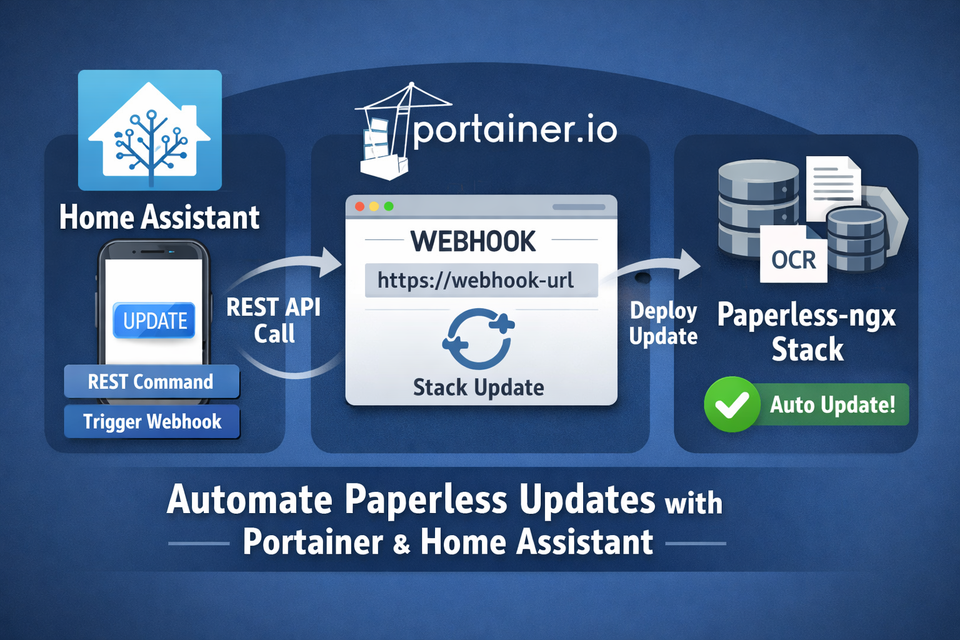
Architecture Overview
Here’s the flow:
Home Assistant → REST Command → Portainer Webhook → Docker Stack Update → Paperless-ngx
This means:
- Home Assistant triggers an HTTP request
- Portainer receives the webhook
- The stack redeploys
- Containers pull latest images
Step 1: Enable Webhook in Portainer
In Portainer:
- Go to your Paperless stack
- Click Editor
- Enable Webhook
- Copy the generated webhook URL
- (Re-)Deploy the stack - Otherwise the webhook will not be enabled.
It will look like:
https://portainer.local/api/webhooks/xxxxxxxx-xxxx-xxxx-xxxx-xxxxxxxxxxxx
⚠ Keep this URL secret — it allows redeploying your stack.
Step 2: Create a REST Command in Home Assistant
In your configuration.yaml:
rest_command:
  update_paperless:
    url: "https://portainer.local/api/webhooks/xxxxxxxx-xxxx-xxxx-xxxx-xxxxxxxxxxxx"
    method: POST
This creates a callable action inside Home Assistant.
Step 3: Trigger the Update
You can now call it from:
Manual Service Call
service: rest_command.update_paperless
Automation Example
alias: Update Paperless Weekly
trigger:
  - platform: time
    at: "03:00:00"
condition: []
action:
  - service: rest_command.update_paperless
mode: single
A better Automation Example
alias: Paperless-NGX Updater
description: ""
triggers:
  - type: turned_on
    device_id: <your paperless ngx device>
    entity_id: <your entity for the software update available>
    domain: update
    trigger: device
    for:
      hours: 0
      minutes: 5
      seconds: 0
conditions: []
actions:
  - action: rest_command.update_paperless
    metadata: {}
    data: {}
mode: single
Button in Dashboard
Add a simple Lovelace button:
type: button
name: Update Paperless
tap_action:
  action: call-service
  service: rest_command.update_paperless
Step 4: What Happens Behind the Scenes
When triggered:
- Home Assistant sends POST request
- Portainer webhook receives it
- Stack redeploy begins
- Docker pulls latest images
- Containers restart
Your Paperless-ngx instance is now updated.
⚠ Important Considerations
1️⃣ Downtime
During update:
- Containers restart
- UI may be temporarily unavailable
Schedule updates during low usage times.
2️⃣ Backup Before Updating
Always back up:
- Database
- Media files
- Configuration
This is critical before automated updates.
3️⃣ Image Tags
If using:
image: paperless-ngx:latest
You’ll always pull the newest version.
For stability, consider pinning versions instead.
Security Best Practices
Because webhooks are powerful:
- Never expose Portainer publicly without protection
- Use a reverse proxy with authentication
- Restrict access via firewall
- Keep webhook URLs private
Optional:
- Use an internal-only network
- Trigger via VPN access only
Advanced Ideas
Once this is working, you can extend it:
🔁 Conditional Updates
Only update if a new image exists.
📊 Notifications
Send a notification when update completes.
🔍 Health Checks
Verify Paperless is running after update.
🔐 Authenticated Webhooks
Proxy webhook behind authentication layer.
Infrastructure Recommendations
Automation-heavy setups benefit from reliable hardware:
💾 NAS Storage
For Paperless document storage (Synology is popular)
🔌 UPS Backup
Prevent corruption during updates (APC units perform well)
🖥 Low-Power Servers
Mini PCs (Intel N100) are ideal for Docker + Home Assistant
These align perfectly with self-hosting audiences and convert well.
Common Mistakes to Avoid
❌ Exposing webhook publicly
❌ Not backing up before updates
❌ Using unstable image tags blindly
❌ Forgetting restart downtime
❌ Hardcoding URLs incorrectly
Final Thoughts
By combining:
- Paperless-ngx
- Portainer
- Home Assistant
You create a powerful, automated update pipeline for your self-hosted stack.
No more manual redeploys.
No more forgotten updates.
Just clean, reliable automation.
About the author
Tim Wilkes is a UK-based security architect with over 15 years of experience in electronics, Linux, and Unix systems administration. Since 2021, he's been designing secure systems for a telecom company while indulging his passions for programming, automation, and 3D printing. Tim shares his projects, tinkering adventures, and tech insights here - partly as a personal log, and partly in the hopes that others will find them useful.
Want to connect or follow along?
LinkedIn: [phpsytems]
Twitter / X: [@timmehwimmy]
Mastodon: [@timmehwimmy@infosec.exchange]
If you've found a post helpful, consider supporting the blog - it's a part-time passion that your support helps keep alive.
⚠️ Disclaimer
This post may contain affiliate links. If you choose to purchase through them, I may earn a small commission at no extra cost to you. I only recommend items and services I’ve personally read or used and found valuable.
As an Amazon Associate I earn from qualifying purchases.